| Author | Message | ||
| Kevin M. Crocker (Zeta1ret)
|
while working on yet another 3d chess variant...i've been having 'issues' with one piece causing a piece behind images partially if not wholely to dissapear... i've adjusted the game perspectived ad nausium...i suspect its somewhere in the 'image rectagle' perhaps too big or something.... my question... IS THERE AN EASY WAY TO INSURE PROPER AND CONSISTENT IMAGE DISPLAY... OR IS THERE A STANDARD ON SHOULD USE WHEN BUILDING A Z-GAME IN REGARDS TO THE PIECE "IMAGE RECTANGLE"... FRUSTRATINGLY YOURS... KEVIN | ||
| David J Bush (Twixter)
|
Position rectangles must never share a pixel, nor may pieces extend beyond their position rectangles. If there is a region which could show two different pieces, one possible solution might be to break positions up into smaller positions, maybe even have multiple grids, if the position rectangles would be different shapes. Then you could have "combination pieces" which display all the different possible ways one or more pieces could exist in that position. Some pieces might show the top of a white king in front of a black pawn, for example. One example of this approach is my Twixt script. (The Twixt game has pieces called "links." I call them "game-links" here to distinguish them from Zillions links.) I have four grids superimposed over the same board: one for the pegs, one for the middle of "steep" game-links, one for the middle of "shallow" game-links, and one for the game-link ends. No grid shares a pixel with any other grid, but the whole board region is covered with all four. The game-link end pieces can display either one or two game-link ends of either one or two colors. There are a total of 40 game-link end pieces, for all the different combinations. Take a look at the routines in the files "macros.txt" and "low24pieces.txt" to see how the code for all this works. Feel free to copy anything you want. Email me at twixt@cstone.net if you have any questions. I recommend you try to avoid using multiple grids if possible. I had to define a ton of links from one grid to another, manually. See my "stdlinksandzones.txt" file. My next upgrade of this script will have just one grid instead of four. David | ||
| Karl Scherer (Karl)
|
Hi Kevin, "Position rectangles must never share a pixel, nor may pieces extend beyond their position rectangles." David Bush said. I strongly disagree. Not only does Zillions allow position rectangles which share pixels, sometimes this is the only way to write a Zillions game. Have a look at my games "Capetown" and "Flamingos". Here the position rectangles share pixels, but the visible images do not. But the latter is not important. Important is that when you place several images on top of each other, you cannot change one below without affecting the top ones. Hence when you rewrite the bottom image, you have to rewrite the top ones as well. (and of course you have to make sure that the writing of the images happens in exactly this sequence; adding a move by a "Random Player" in the turnorder can help here, for example). Cheers, Karl | ||
| David J Bush (Twixter)
|
I downloaded Capetown. The ZRF uses rectangles which are wholly contained inside other rectangles, like this:  In such a case, it is clear which is 'bottom' and which is 'top.' I ran into problems with my program, when I tried to display pieces whose position rectangles intersected each other thusly: 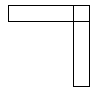 Even though the actual piece images shared no pixel with each other, display of the horizontal rectangle caused any piece in the vertical rectangle to disappear, regardless of which piece was placed first. Apparently, the original poster to this thread has problems with rectangles that intersect as follows: 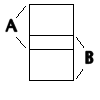 Maybe his problem can be solved by making sure position A is always changed before position B, or vice-versa. I don't know. But I do know that Jeff Mallett has told me that Zillions is not currently designed to support overlapping position rectangles. So even if you do find a solution this way, where is the guarantee that it will work on other machines, or with future releases of Zillions? The solution I came up with, is to turn two overlapping rectangles into three distinct rectangles. In the example above with the two skinny overlapping rectangles, I now have a small square and two slightly shorter rectangles. For the original poster, perhaps you could turn the intersection of A and B into a third position C. Good luck! David | ||
| Karl Scherer (Karl)
|
the guarantee that my solution works in my case comes from the way I implemented it, as I mentioned: If there is a separate additional drop, then this comes next. There is no confusion with the sequence. Newer versions of Zillions cannot change the drop sequence since it is defined by the programmer, not the Zillions machine. | ||
| Karl Scherer (Karl)
|
In addition to the above, I would like to mention that it is always better to have a solution to a problem than no solution at all. Even in the case that a future version might change certain things, for a programmer who wants to solve a problem now to play it with friends and to share it and have fun with it, it is surely more satisfying to be able to have a program that runs than no program at all. Whether it is Zillions-versions-safe for all time in the future might or might not be a matter of concern. I suggest we leave this judgement to the reader instead of not publishing something that helps now. Furthermore, in the worstcase scenario one can keep an older Zillions version to play a game forever. There is no obligation to run a game always in the newest version of Zillions. All our computers are now big enough by far to keep several older Zillions versions anyway. But then I wonder whether we will ever get a new Zillions version anyway...?? Cheers, Karl | ||
| David J Bush (Twixter)
|
| In addition to the above, I would like to mention that it | is always better to have a solution to | a problem than no solution at all. Absolutely. And you can certainly keep an older version of Zillions if necessary. But we might be wandering a bit off topic here. The original poster wants to do a 3D chess program. The problem is, the top of one piece eclipses the base of the piece on the square 'behind' it. My solution is to chop the board up into smaller positions. The diagram below shows a portion of this grid: 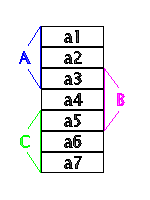 Each piece will span three positions. For example, a piece on chess square A will have its base shown in a3, its middle in a2, and its top in a1. A piece on square B will have its base in a5, its middle in a4, and its top in a3. I make the simplifying assumption here, that the base of each White piece will look the same, and also for Black. There will be 50 different pieces: piece middles: 6 types (pawn, knight, bishop, rook, king, queen) in 2 colors, 12 total; combination top/bottom pieces: 3 possibilities for the base (none, white, or black) 13 possibilities for the tops (none, 6 white, 6 black) The blank base + blank top combination is not needed. that leaves 38 total combination pieces. Let's look at how a piece will be placed on square B. I call this piece "piece X" where X could be any piece. Whether a capture is involved, or square B is initially blank, the same algorithm should work. a4 is the middle position, which does not depend on what is in square A or square C. Just place the middle of piece X there. To determine what to put on a3, check the status of position a2. There are three cases: a2 is blank, or a white piece is there, or a black piece. In each case, place the appropriate combination of the top of piece X and the bottom of any piece in square A. There are 13 cases to check for a5. The base of piece X might have no piece top from square C in front of it, or it might have any white piece top, or any black piece top in front of it. Each case must be checked so the appropriate combination piece is placed. Again, you do your checking on a6 in order to determine what to place on a5. You do this in case there was a piece already on square B. The macro placelinkend in my macros.txt file, which is part of my Twixt package, follows a very similar algorithm. The key is to use a lot of parameters. In the above case, you would need: 1 parameter for what piece type goes in a4, 3 parameters for what piece type goes in a3, and 13 parameters for what piece type goes in a5. That's a total of at least 17 parameters, maybe more. With this approach, the same macro will place any type piece on any desired square. Of course, you would also need a routine to correctly remove piece X from whatever square it came from. I would be glad to try to explain the above algorithm in more detail, if you like. Email me at twixt@cstone.net | ||
| Kevin M. Crocker (Zeta1ret)
|
WOW...THANKS GUYS FOR THE FEEDBACK... (ive almost got it myself...by a 'shot in the dark' method of redesigning the perspective of the board and making the pieces all the same height and a little smaller...) I do agree that my 'way' is a less inspired 'cop out'...but in the long run it's a little easier for me... maybe you will play it when i post it... thanks again! -k |