| Author | Message | ||
| David J Bush (Twixter)
|
Most games use piece images that stay within the position rectangle they are placed in. Twixt is an exception; each link actually consists of three piece images that merge with each other to produce the illusion of a single piece. I am working on another game which does this, but I ran into a Zillions "enlarge" bug. Here is a shot of a portion of the game board in normal size: 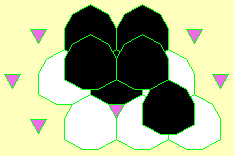 Here it is after "enlarge board" was selected: 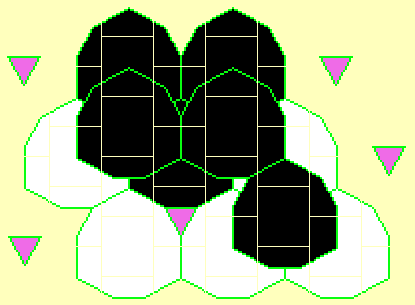 You can see the outline of the grid of position rectangles, which the user should not see. Twixt doesn't have this problem. The difference? ODD SIZE versus EVEN SIZE! This new game of mine uses positions that are 26x30 pixels. If I change the grid to 25x29, for example, the enlarge bug will go away. But that's over 200 images I have to redesign. And 25x29 will not work for me; the vertical dimension must be divisible by 3. Also the ratio of vertical to horizontal must be close to a certain ratio, so the pieces look symmetric. I'm tempted to submit the game without changing the graphics. Anyway, don't let this happen to you! If your game uses images that "blend" across position boundaries, make sure your positions have odd dimensions! David | ||
| Dan Troyka (Dtroyka)
|
I've run into that problem as well in a script where 4x4 gray blocks were used to fill in 4x4 positions in a grid so that the board is covered up. On regular size the gray blocks filled in the grid continuously with no line in between laterally adjacent blocks.  When enlarged the background would show through in a one pixel strip. 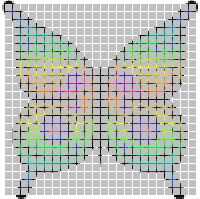 What's happening in your case, I think, is not that the outline function is mistakenly turned on but that the background is showing through in that one-pixel border region. In my case all I had to do was oversize the block image from 4x4 to 5x5. This had the effect of filling in the extra pixel line when enlarge was selected and the problem went away. In your case this would still require modifying 200 plus images (ouch). If I recall correctly the strip appears on the right and bottom of each grid space, so the piece image would need to be enlarged one pixel in these two directions (but I could have this reversed). | ||
| David J Bush (Twixter)
|
Thanks for the suggestion, but oversizing an image beyond the bounds of its position rectangle takes you into the "grey area" (so to speak) of undocumented Zillions capabilities. Who's to say, if this solution will continue to work for future versions of Zillions, or even under different versions of Windows? Especially in this case, which is a Zillions bug that is bound to be fixed eventually, and when it is, maybe your solution won't work any more... ? I would prefer to avoid anything that might not work later down the road. Maybe I'm just looking for an excuse to avoid modifying all those images. 26/30 is sooo close to (Sqrt(3))/2 ... | ||
| Jeff Mallett (Jeffm)
|
The odd/even difference turned out to be a rounding problem in Zillions that made itself evident when the board was enlarged. I have fixed it in version 2.0.1, which is now available. |